Another redesign - all the way to IE6
Light and dark mode this time! Enjoy Baby Dusty peeking at you when browsing in light mode, even in IE6!
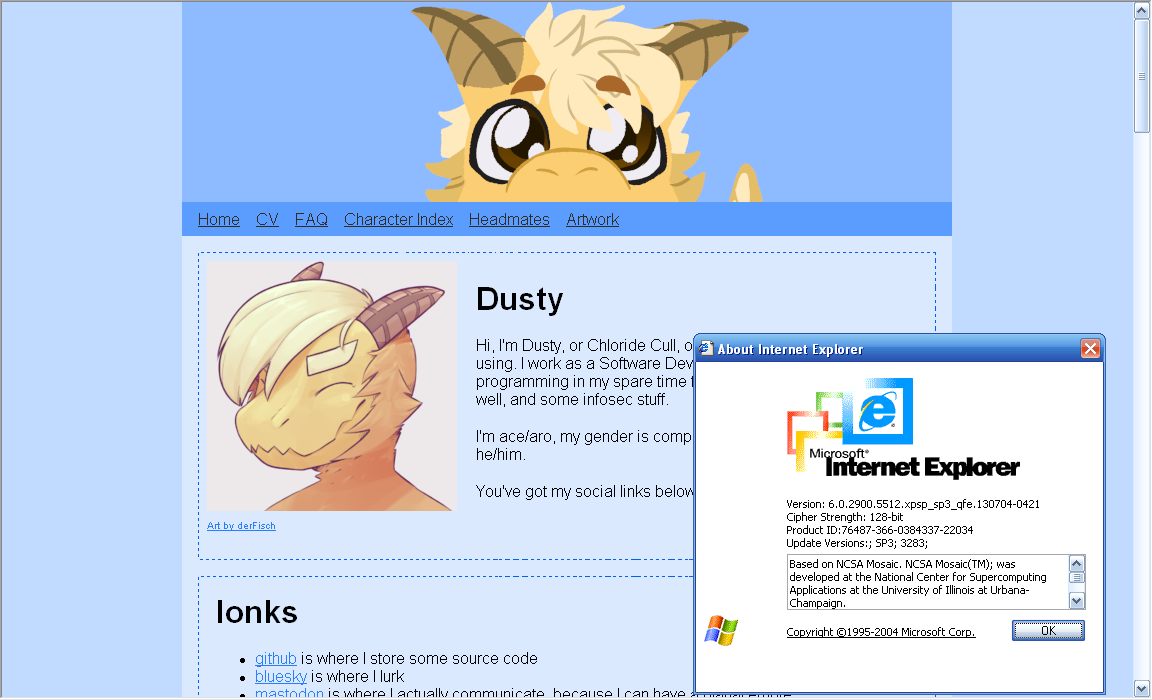
How on earth did you pull this off?
I learned some strategies as part of trying to make this nice looking on IE6. It helps that Microsoft still has some documentation on what's supported. and the Developer Toolbar is archived.
While I obviously could've just used IE's weird conditional comments, that wouldn't help people trying to use other old browsers.
First off, media queries. While the at-rule is supported since IE 5.5, an "and" rule with a query is always evaluated as false. Combine this with treating desktop as default, and it's reasonably fine. For example:
body {
    margin: 0 auto 0 auto;

    // Fix the width at 770px to make sure the width is correct in IE6.
    width: 770px;

    @media screen and (min-width: 1px) {
        // Set a dynamic width on more modern browser where that's supported and important, like phones.
        max-width: 770px;
        width: 100%;
    }

    @media screen and (max-width: 770px) {
        // Remove the centering margins once we're below the 770px breakpoint.
        margin-left: 0;
        margin-right: 0;
    }
}
IE6 also doesn't support child combinators (the ones like div > p) just plain descendant selectors. Support for this was added in IE7, while media queries were added in IE9, so this can be used to apply rules specifically for that window. I don't have any such rules though.
Second, you have to give up some of the newer semantic elements, like <header>, <footer>, and <nav>. IE6 doesn't properly nest elements under elements it's not aware of, the Developer Toolbar will show that they get parsed as separate opening and closing tags. This is most likely just a Trident quirk - IE was always famous for not parsing HTML like its peers. I replaced all of them with plain <div>s with styling based on IDs instead. Just remember to set a role attribute to not make people with screen readers hate you.
Third, GIFs are surprisingly good. IE6 doesn't support transparent PNGs, and it turns out that lots of the art I have do 256-color, 1-bit alpha really well.
Other than that, not many changes were needed. I ripped out a lot of things like flexboxes back in the start of 2025 when I tried to make this site be usable in IE4, but that's for another post, involving Caddy powered crimes...
I'd like to mention that I am aware of some layout issues in IE6, specifically to do with images in posts, and the artwork page. Those aren't that trivial to fix, sadly.


